General structure & UML
aXqua consists of three parts that can be used independently of each other: a library that builds and evaluates models, a job system that runs simulations as independent processes, and the QGIS plugin as the user interface.
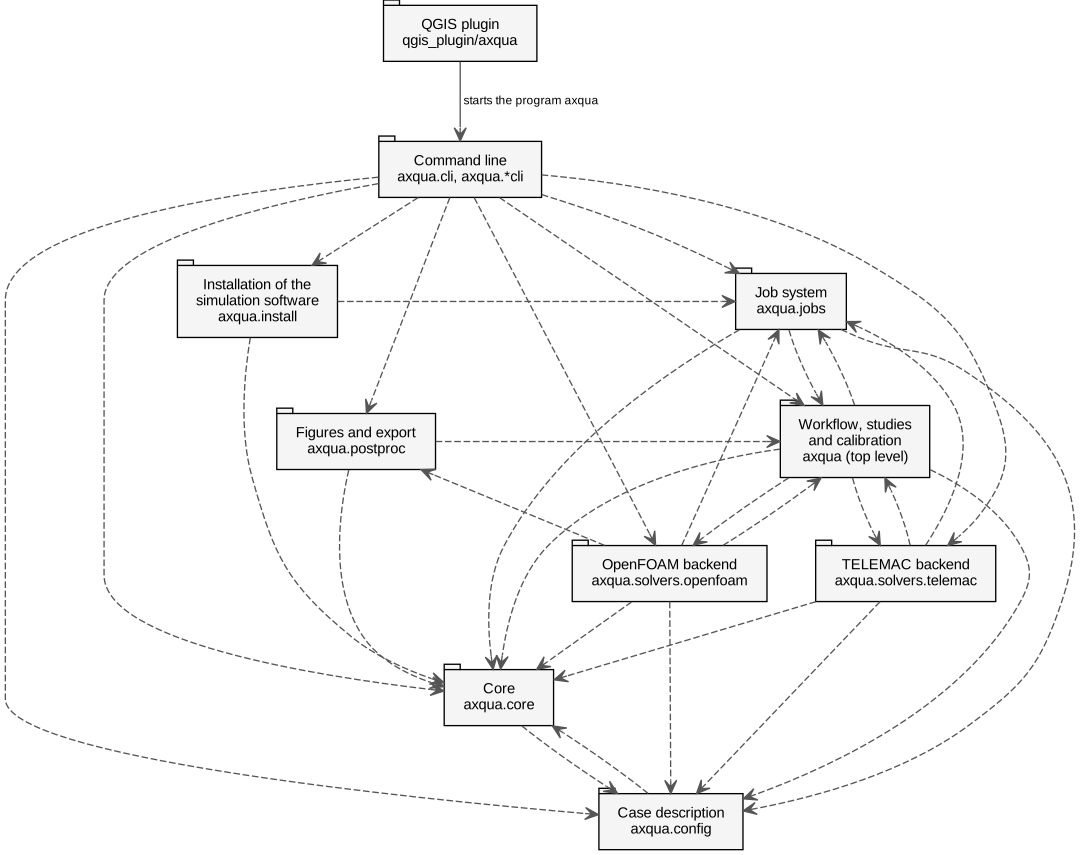
Packages of aXqua in the notation of the Unified Modeling Language (UML). A dashed arrow points from a package to a package that it uses. The plugin is connected by a solid arrow, because it does not use the library as program code: it starts the program axqua and reads the files that the program writes.
The diagram shows the three design rules that are stated below: no arrow leads from the core to a backend, none connects the two backends, and the plugin reaches the library through the command line only. The diagrams of this section are generated from the source code with the script scripts/build_uml.py and therefore show the code as it is.
Class diagrams of the central data structures are part of the pages that document them:
the case description, with one class per block of a case file (Classes of the case description (axqua.config). The class Config contains one class per block of a case file, and some blocks contain further classes, for example one class per calibration parameter.);
the profile of the computer and the messages of the checks (Classes that describe the computer and the messages of aXqua. The profile (AxquaProfile) contains one binding per simulation code. The five error types are derived from one general error type.);
the simulation codes behind one interface, and their capabilities (The simulation codes behind one interface. Both backends are derived from BaseBackend, which fulfills the interface SolverBackend. BackendSpec describes a backend and its capabilities without loading it.);
a job, from its submission to its result (Classes of a job. JobSpec is the description that is submitted, with one class of options per type of job. JobStatus is the state that the running job reports, with one class of progress per type of job. The four launchers fulfill the interface JobLauncher and detach a job on Linux, on Windows and in the Windows Subsystem for Linux.).
The class diagrams use three types of connections. An arrow with a hollow triangle points from a specialized class to the general class from which it is derived. A line with a filled diamond connects a class with its components, with the diamond at the class that contains them. A dashed arrow with a hollow triangle points from a class to an interface that the class fulfills. The label above a class name, for example «dataclass» or «enumeration», states the type of the class.
Design rules
Three rules determine the structure. Each of them is enforced by an automated test that reads the source code.
The core does not depend on a simulation code.
axqua.coredescribes the free-surface water body and the modeling task. The backends inaxqua.solversdepend on the core, never the reverse. A further simulation code can therefore be added without changing the core.The backends do not depend on each other. The TELEMAC backend and the OpenFOAM backend do not import each other. Steps that involve both codes, such as the TELEMAC warm-up of an OpenFOAM model, are coordinated one level above (
axqua.prerun,axqua.workflow).The plugin does not import the library. QGIS has its own Python installation, whereas the library requires several geospatial packages and the environment of a simulation code. The plugin therefore calls the program
axquaas a separate process and exchanges only small pieces of information with it: a job ID, a state, a file path. Result data never passes through the plugin. QGIS opens the result files itself.
A consequence of the third rule is that a simulation does not depend on QGIS being open. The plugin submits a job and displays its state, but the job belongs to the operating system.
Packages
Package |
Content |
|---|---|
|
The case description as Python data classes, with reading and writing of the case file (Configuration). |
|
Geodata, rasters, boundaries, structures, the SELAFIN file format, capabilities, the registry of backends, error types and the environments of the simulation codes (Solver-agnostic core). |
|
Mesh generation, boundary conditions, steering files, runs and evaluation for TELEMAC (TELEMAC backend). |
|
Mesh generation, initial fields, dictionaries, runs and evaluation for OpenFOAM (OpenFOAM backend). |
|
Steps that are independent of the simulation code or involve both codes: terrain processing, measurements, studies and calibration (Workflow, studies and calibration). |
|
Identity, storage, execution and detaching of jobs (Job system). |
|
Figures from results (Postprocessing). |
|
The QGIS plugin (QGIS plugin). |
The backends are registered through the entry point group axqua.solvers of the Python package. A further simulation code can be provided as a separate Python package that registers itself in this group.
Capabilities
Each backend declares which types of simulation it supports, for example a steady 2D simulation or a mesh convergence study. For a given case, aXqua reports each capability on three independent levels:
implemented: the backend supports the capability (yes,no, orn/awhen the capability does not exist for the code);configured: the case file requests it;builtandrun: the input files and the result files exist.
The command axqua case-status <case-file> --json returns this information. The plugin uses it to decide which functions it offers for a case.
Licenses
The library is distributed under the BSD 3-Clause License. The QGIS plugin is distributed under the GNU General Public License, version 2 or later, because it uses the programming interface of QGIS.