Batch-processing (visual automation)
A complete study consists of several steps that depend on each other, for example preprocessing, a dry run, a mesh convergence study and a calibration. Batch-processing runs such a sequence without supervision.
A sequence of steps
The Batch-processing tab lists the steps of the workflow for the active case: the build of the TELEMAC model, the steady 2D simulation, the mesh convergence study, the build and the run of the 3D model, the build and the run of the fine sediment simulation, the Bayesian calibration, and the validation. Tick the steps to run and click Submit the ticked steps. aXqua submits one job per step in the order of the list. The jobs of these steps run one after the other for one case, so that each step starts when the step before it has ended. The job list below the tabs shows waiting for with the ID of the job that a step waits for.
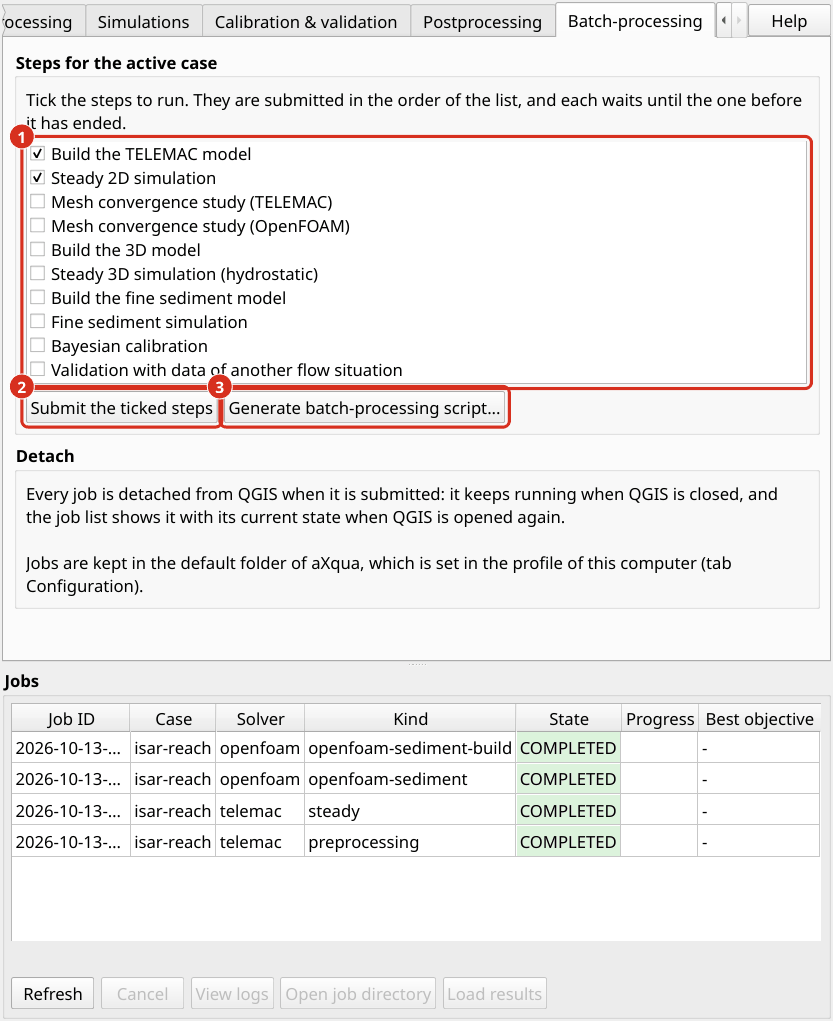
The Batch-processing tab. (1) The steps of the workflow, each with a check box. (2) Submit the ticked steps starts them one after the other. (3) Generate batch-processing script… writes the same sequence as a script for a terminal.
A waiting step does not check whether the step before it succeeded. If the build fails, the simulation that follows starts nevertheless and fails with a message that states what is missing. Use the script described below for a sequence that has to stop at the first failed step.
Generate batch-processing script. The button Generate batch-processing script… writes a shell script for the ticked steps and the active case. The script submits the steps one at a time, waits for each job, and stops when a job does not complete. Start it in a terminal with nohup bash <script> &, so that it continues after the terminal is closed (Batch-processing (headless)).
Detach: jobs continue without QGIS
Every simulation that is started from the plugin is a job that is detached from QGIS when it is submitted. QGIS can be closed afterward, and the computer can be used for other work. When QGIS is opened again, the job list shows all jobs with their current state, including jobs that finished or failed in the meantime. A job that was interrupted by a restart of the computer is marked as failed and can be submitted again. The section Detach of the tab states where jobs are kept and how they are detached. Both are set in the profile of this computer (Plugin setup).
Sequences with the QGIS model designer
aXqua adds three algorithms to the QGIS Processing Toolbox, which can be combined in the model designer of QGIS (menu Processing):
Algorithm |
Function |
|---|---|
Submit a simulation job |
Checks the case, creates a job and returns its ID. The algorithm does not wait for the simulation. |
Check job status |
Returns the current state and progress of a job. |
Import job results |
Loads the results of a completed job with the predefined map styles. |
With these algorithms, the same case can for example be submitted for a series of discharges.